Visual workflows
Define triggers, conditions, waits, replies, assignments, and webhooks in a journey your team can review.
Lippem connects WhatsApp Business through Meta’s official flow and turns every message into a visible process: response, qualification, assignment, follow-up, and human handoff when needed.
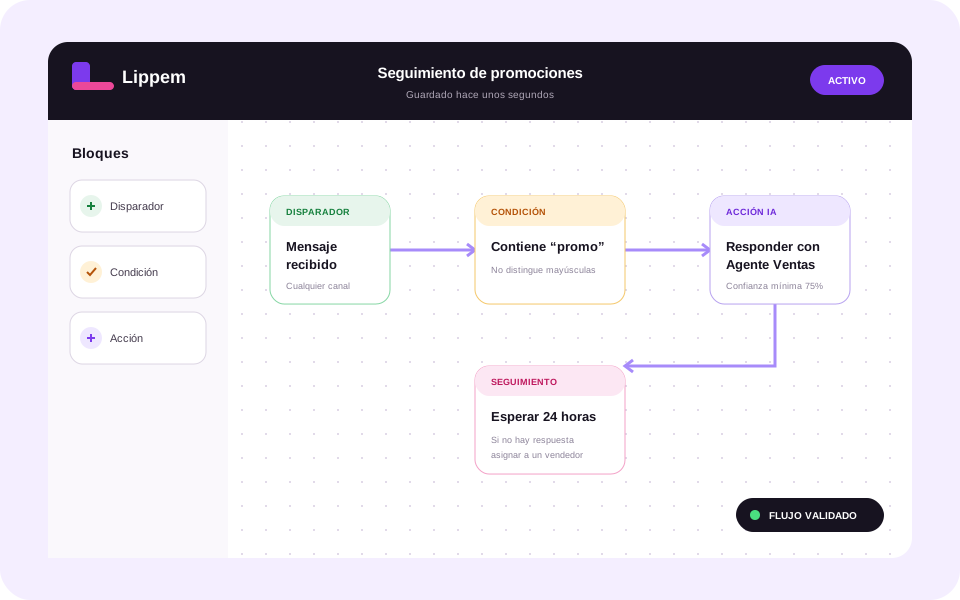
Fast replies help, but reliable automation needs context, rules, and supervision. Lippem combines a shared inbox, AI agents grounded in business knowledge, and visual workflows so the team knows what happened and what comes next.
Define triggers, conditions, waits, replies, assignments, and webhooks in a journey your team can review.
The agent checks company-provided knowledge before answering instead of behaving like a generic bot.
Schedule reminders and next contacts so an opportunity does not go cold after the first message.
When confidence is low, assign the conversation to a teammate while preserving its complete history.
Authorize WhatsApp Business through Meta Embedded Signup without sharing passwords or manually copying tokens.
Provide the product, service, policy, and process information the agent needs.
Choose what triggers automation, which conditions are evaluated, and when your team must step in.
Review conversations, confidence, and executions to refine knowledge and rules using real evidence.
Connection uses a WhatsApp Business account compatible with Meta’s official process. Number eligibility is validated during guided onboarding.
Yes. Workflows can assign a conversation to a teammate and preserve the full context generated before handoff.
Yes. Conditions, actions, and confidence thresholds determine when the agent acts and when it escalates.